


Buy anything from 5,000+ international stores. One checkout price. No surprise fees. Join 2M+ shoppers on Desertcart.
Desertcart purchases this item on your behalf and handles shipping, customs, and support to SINGAPORE.
✨ Light up your 3D printing game with BIQU Panda Status — where style meets instant clarity!
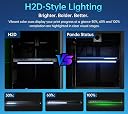
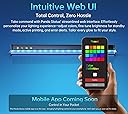
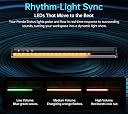
The BIQU Panda Status LED Light Indicator is a premium upgrade for Bambu-Lab A1, P1S, P1P, X1C, and X1E 3D printers, delivering vibrant H2D-style dynamic lighting that instantly communicates printer status. Featuring easy installation without hardware changes, customizable colors and brightness via web control, and a unique music-sync mode, it enhances both functionality and aesthetics. Its heat-resistant design ensures durability in demanding printing environments, making it a must-have for professionals seeking real-time feedback and a stylish workspace.





| ASIN | B0FGPCMM7D |
| Brand | BIGTREETECH Direct |
| Colour | Multicolored |
| Customer Reviews | 4.1 out of 5 stars 37 Reviews |
| Form Factor | LIGHT_STRIP |
| Included Components | Panda Status |
| Light Color | Multicolor |
| Light Colour | Multicolor |
| Light Source Type | LED |
| Manufacturer | BIGTREETECH Direct |
| Manufacturer Part Number | USA6-1060000826 |
| Number of Items | 1 |
| Product Features | H2D-style dynamic lighting, Printer status indicator, Web/App control, Music-sync mode, High-temperature resistance |
| Product Style | Panda Status |
| Style | Panda Status |
G**N
Cool X1C Accessory
I wanted this as soon as I saw it for my X1C because it makes monitoring the progress of prints easily from across my office while I work on other things and it does not timeout like the X1C screen. The install was surprisingly quick and easy just following the instructions provided in the Wiki and I was able to get it connected to my wifi and bound to my X1C on the first try without any problems. For anyone concerned, the current Bambu Lab firmware does not interfere with this device at all, it is able to receive all the status information and does it in real time meaning that it changes just as quickly as the X1C's onboard display so there is no lag at all. I don't think I can call this a "must have" accessory, but it does improve functionality in my particular use case and for others that just want their printer to look cool, it does that too! My only criticism is that the wire routing in the instructions doesn't look great but does work, so I will likely be rerouting that wire my own way that conceals it better, but I do understand why the instructions are the way they are because their routing is very easy and foolproof for anyone to follow and will always work without causing any interference with any moving part of the printer or causing any warranty issues.
J**S
Great addition to your P1S
Works and looks great on P1S. I can glance from a distance and get a feel as to how much print time I have left.
J**Y
Installation effort outweighs any perceived benefit.
I should have known this was not worth the installation effort. The "Frequently Returned Item" notice should have been my first clue. I can get all of the information this provides from the Bambu Handy App for FREE. And i don't have to apply a bunch of double sided sticky tape and plug in yet another cord to a power source and add another WiFi connection. Oh, and print my own parts,... and yes they attach with double sided sticky tape too! All of this to make it look like a fugitive from the carnival. "WhooHoo, look at all of those flashy colored lights",... what was i thinking? 3D printing is great but skip this extra frustration.
F**K
Works on X2D with new firmware
BTT is providing updated firmware on github. As of the latest it states P2S compatibility but does also detect and pair with X2D. Install requires trimming the flange on the back of the board in that case. I opted to go out at the bottom with the ribbon cable and install the controller underneath the printer.
A**R
It was a bit of a journey, but the Panda Status is worth the effort.
(review of BIQU Panda Status LED Light Indicator) I jumped on this product a bit too quickly—there’s currently no installation or usage documentation available. The box includes all the parts you need, but the only guidance is a QR code leading to a blank wiki page. Some parts of the installation are obvious, like where to place the LED status bar itself. However, critical details are completely unclear—such as how to route the cables, where to mount the controller, and what app or software to use for control. My advice: check the BIQU/BigTreeTech wiki for updated instructions before buying. Until then, this isn’t ready for most users. Update 7/29/2025: The instructions have been posted to the wiki. I'll try to get this installed this afternoon and update this review. Update 8/10/2025: It took a bit longer to get around to this than I had planned, but the provided instructions were accurate and easy to follow. I went ahead and used the provided web interface to get the Panda Status onto my WiFi network, and configured the status bar to reflect the state of the prints (H2D mode). With a bit of custom coloring, it's now easy to see at a glance how far along your prints are. I don't like that I had to hook up a separate USB power cable, I would rather have tapped an internal power line from somewhere inside the printer. But that probably would have made the Status a lot harder to install. Overall it's a good product, and now that the instructions are online it's certainly worth adding especially if you run many printers at once.
Trustpilot
3 weeks ago
3 weeks ago